Hydrogen Bomb vs. Coughing Baby: H100 vs. RTX 3060
In this blog, we will benchmark my RTX 3060 Mobile against an H100 using Accel-Sim, which just dropped one of its biggest updates ever. To put it in perspective, the version before that was released 4.5 years ago, and since then they just added patches, fixes and PRs along the way.
For those who don’t know, Accel-Sim/GPGPU-Sim is one of the most used GPU simulators in all of academia, if not the most. And I had a chance to contribute to that a while ago.
- paper
- Architecting the Next Generation of Asynchronous, Distributed GPUs for the AI Era (arXiv)
- code
- github.com/accel-sim/accel-sim-framework
- release notes
- Accel-Sim v2.0.0
- all the data
- H100 vs. RTX 3060, sim vs. real RTX 3060, simulator stats (interactive, best on a laptop)
Note: This is supposed to be a fun profiling blog/experiment, not a tutorial. I’m not providing the source code or step-by-step guide on how to reproduce it here (since the setup alone is such a pain). I swear I spent around 3+ hours just to get everything running smoothly, and around 5+ hours for all the runs to finish. So yeah, this is entirely a “trust me bro” situation.
TL;DR
- The fight: a simulated H100 (132 SMs and a whole bunch of other features) vs. my 5-year-old RTX 3060 laptop GPU (30 SMs), on 14 small CUDA apps from 2009, in Accel-Sim 2.0.
- The result: against my real laptop at its real clock, the H100 is only 1.82× faster. On some workloads, it’s not faster at all.
- Why: most of these apps launch too few CTAs to fill even the 3060, so the extra SMs sit idle. Most of the H100’s win comes from its clock. Also, running 2009-era kernels and no ML workload is just literally turning the H100 into an RTX 3060 with better specs to be honest.
- Found along the way:
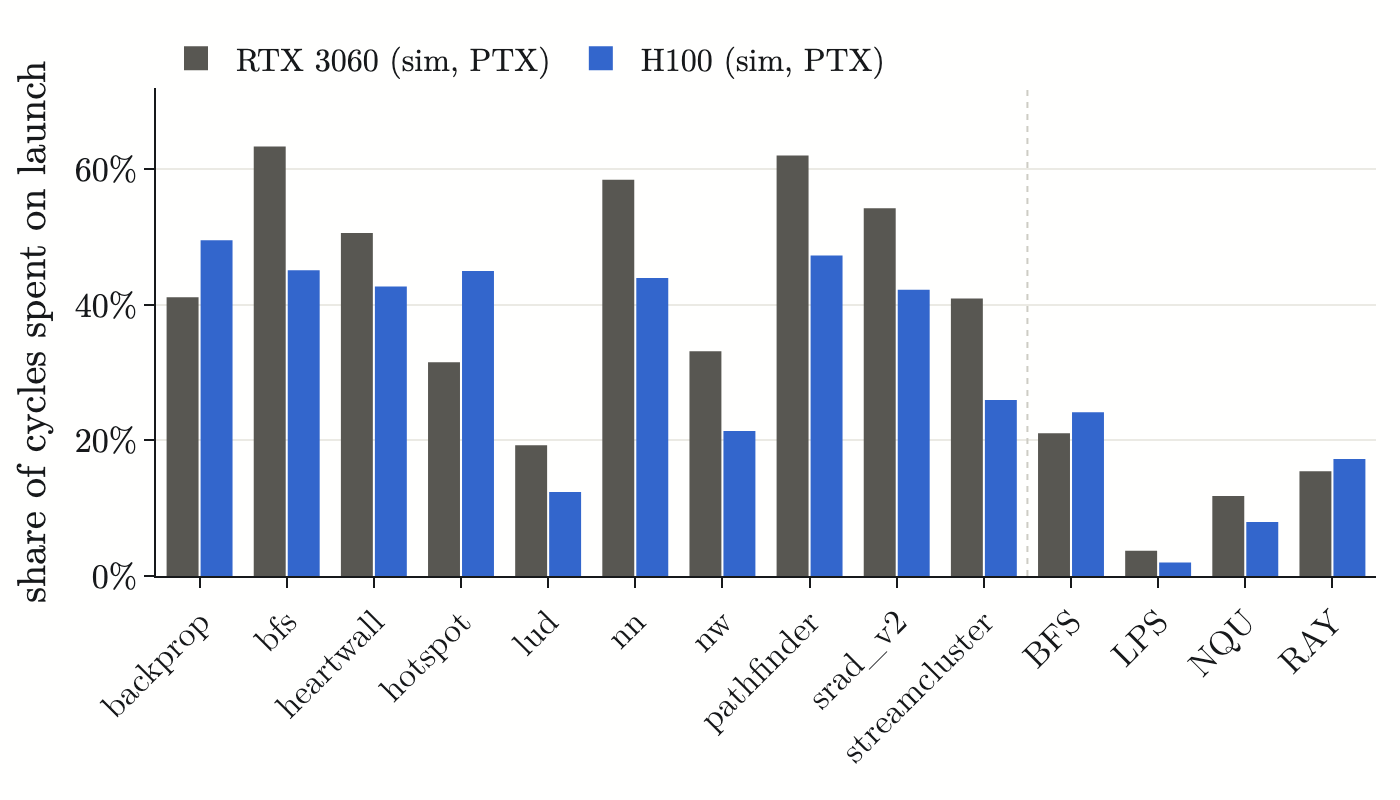
- On the tiny apps, one fixed launch-latency constant makes up 30–67% of the simulated cycles. The sim’s 15% cycle error says more about that one number than about the SMs (section 8).
- My 3060 config started every kernel with a cold L2, because of a flaky microbenchmark. Fixing it moved the sim-vs-sim speedup from 2.94× to 2.74× (section 9).
- Accel-Sim 2.0 ran 25% slower than 1.x on the same traces, not 2.2× faster (section 10).
1. What Changed in Accel-Sim 2.0
The paper sums it up in one table [1]:
| Inherited from Accel-Sim 1.x | Added in Accel-Sim 2.0 | |
|---|---|---|
| # SMs | 132 | new operand collector, spinloop support, chiplet-aware CTA scheduling, Cooperative Groups support, cluster control |
| L1 cache / shared memory | 256 KB, 4 banks | TMA, CGA multicast, Distributed Shared Memory |
| # exec units† | 4 FPs, 4 DPs, 4 INTs, 4 SFUs, 4 HMMAs | WGMMA, UTC*MMA, warpgroup commit/wait, 2-CTA, exec unit refactor |
| L2 cache | 50 MB, 80 banks | modulo IPOLY hash, LRC, chiplet cache policies |
| MMA latency | fixed | variable (depending on N) |
| memory | HBM bandwidth/latency | HBM3, HBM3e bandwidth/latency |
| interconnect | monolithic crossbar | chiplet interconnect, NVLink |
| sync primitives | barrier | mbarrier, bar.arv, bar.sync, ldgstsbar, fence, UTCBAR, WARPGROUP |
| tracer | SASS register dependencies, control flow | register value tracing, spinloop handling, multi-GPU tracing, trace compression, trace paging, tensor descriptor support, PyTorch per-layer support |
| performance counters | 54 | 11,072 |
| correlation | kernel-level Nsight Compute | cycle-level GPUVision |
The H100 config in Accel-Sim 1.x vs. 2.0, from Table I of the paper. †FP: single-precision floating point, DP: double-precision floating point, INT: integer, SFU: special function unit, HMMA: Volta tensor core.
On the performance side:
- Updated the operand collector, refactored the SIMT pipeline, plus other software optimizations.
- Claimed a 2.2× speedup over Accel-Sim 1.x (in the paper and the release notes), even with all the new features.
- Added GPUVision, which calls CUPTI’s PM-sampling API to get counters as a time series within a kernel. The old versions use nvprof (for pre-Turing GPUs) or ncu, which gives one total per kernel.1
- Performance counters: 54 → 11,072 (that’s 205× more!)
There are so many more features that I cannot list all of them. That’s fair game since Hopper is a big jump compared to other generations (especially when placed against my RTX 3060 Mobile). See the paper for more details (or even better, the release notes).
And it shows. On Hopper, the paper says 1.x had a 36% cycle error on HPC workloads and 46% on CUTLASS GEMMs (it couldn’t model TMA or mbarrier at all). 2.0 gets it down to 13.5% overall against a real H100.
In short, it can now simulate the warp-specialized, asynchronous style of modern AI kernels like FlashAttention or CUTLASS Hopper GEMMs.
- Note that ncu uses CUPTI internally, so hardware data always comes from CUPTI. Accel-Sim just calls it out explicitly this time. ↩
2. Why 2009 Kernels?
But yeah, we’re not doing that here. We’re going to benchmark it on 2009-era kernels.
“Why?” you may ask (obviously). Well, my poor laptop from 2021 is not built for this,2 and we also don’t have access to any H100 to benchmark against (technically I can rent one for $4, but yeah, I’m not running ML SASS on my laptop).
And ML in PTX mode? That’s out of the question. I don’t have all day to run that. Also, most ML kernels like cuBLAS, cuDNN and FlashAttention ship as SASS with barely any PTX, so PTX mode often can’t even run them.
So 2009 kernels we go.
- It has trouble booting up, so I avoid using it at all costs (only when I seriously have to, like for simulating this battle). The fan goes full jet engine the moment I open anything (Alienware pls fix this), the battery drains super fast (maybe too old), and it always wants to update before I can shut it down. And then it won’t even finish the update. ↩
3. Setup
The two contenders, as configured in the simulator:
| RTX 3060 Mobile | H100 | |
|---|---|---|
| SMs | 30 | 132 |
| core clock | 975 MHz (base, what ncu locks it to) | 1980 MHz (SXM max boost) |
| L2 | 24 sub-partitions, at the core clock | 80 sub-partitions × 640 KB = 50 MB, at 2× the core clock |
| memory channels | 12 | 40 |
| DRAM model | detailed GDDR6 | simple fixed latency |
| launch latency | 5,000 cycles per kernel | 3,000 cycles per kernel |
| simulation modes | SASS (trace replay) and PTX | PTX only (no H100 to record traces on) |
So three configs in total, all with warm L2 (cudaMemcpy data lands in L2, which is what real GPUs do, more on that in section 9): RTX3060M-MEMCPYL2ON-SASS, RTX3060M-MEMCPYL2ON-PTX and H100-PTX.
We will be using 2 test suites: Rodinia 2.0-ft [2] and ISPASS-2009 [3].
Rodinia 2.0-ft
Rodinia (U. Virginia, 2009) is a suite of small kernels from many fields. The -ft versions used here were shrunk by UBC so they finish fast in GPGPU-Sim. They exist as smoke tests, not as stress tests (see gpu-app-collection/src/cuda/rodinia/2.0-ft/README.md). Keep in mind that these are tiny inputs.
| app | what the GPU does | input | kernels | max CTAs × threads |
|---|---|---|---|---|
| backprop machine learning | Trains one layer of a 2-layer neural net. layerforward does a shared-memory reduction of input × weight, then adjust_weights applies the update | 4,096 input nodes | 2 | 256 × 256 |
| bfs graph traversal | Breadth-first search, one thread per node. Kernel expands the frontier, Kernel2 swaps masks. Repeats once per BFS level (8 levels × 2 kernels) | 4,096-node graph | 16 | 8 × 512 |
| heartwall medical imaging | Tracks the heart wall in an ultrasound video frame. Each CTA follows one sample point, matching a template by correlation | 1 frame | 1 | 51 × 512 |
| hotspot physics / EDA | 2-D thermal stencil over a chip floor plan. Each launch advances several time steps at once (a “pyramid” of halos in shared memory) | 30×30 grid, 40 steps, pyramid 6 | 7 | 64 × 256 |
| lud linear algebra | Blocked LU decomposition. The diagonal, perimeter and internal kernels shrink as the factorization proceeds (9 CTAs down to 1) | 64×64 matrix | 10 | 9 × 256 |
| nn data mining | k-nearest-neighbor: Euclidean distance from every hurricane record to a target lat/long | 4 record files | 4 | 938 × 16 |
| nw bioinformatics | Needleman–Wunsch DNA alignment. Fills a DP matrix in anti-diagonal waves: CTA count grows 1→8, then shrinks 8→1 | 128×128, penalty 10 | 15 | 8 × 16 |
| pathfinder dynamic programming | Finds the min-cost path down a 2-D grid, row by row, several rows per launch | 1,000 cols × 20 rows, pyramid 5 | 4 | 5 × 256 |
| srad_v2 image processing | Speckle-reducing anisotropic diffusion (ultrasound de-noising). Two stencil kernels per iteration | 128×128 image, 2 iterations | 4 | 64 × 256 |
| streamcluster data mining | Online k-median clustering. pgain evaluates opening a new center and is called from a CPU loop | 1,024 points, dim 16 | 130 | 2 × 512 |
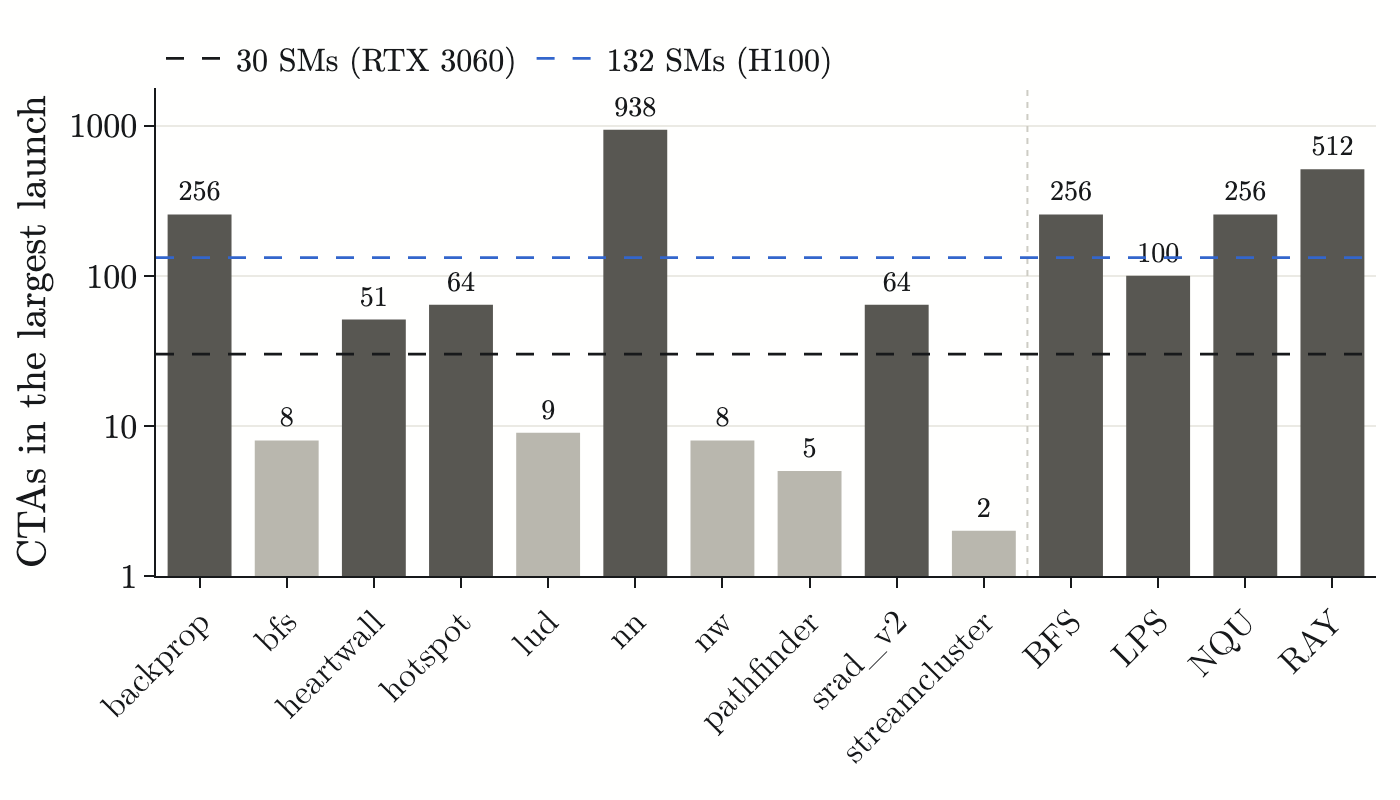
5 of the 10 apps (bfs, lud, nw, pathfinder, streamcluster) never launch more than 9 CTAs, so they can’t even fill the 30-SM laptop GPU. streamcluster runs 130 kernels of 2 CTAs each: 2 of 30 SMs busy, every time.
ISPASS-2009
| app | what the GPU does | input | kernels | max CTAs × threads |
|---|---|---|---|---|
| BFS graph traversal | Breadth-first search (different code from Rodinia’s) | 65,536-node graph | 9 | 256 × 256 |
| LIB finance | LIBOR market model Monte Carlo: prices a swaption portfolio, one path per thread. Two kernels: prices, then prices plus sensitivities. Long, compute-heavy, few CTAs | 4,096 paths, 15 swaptions | 2 | 64 × 64 |
| LPS physics | 3-D Laplace equation solver (Jacobi iteration on a regular grid). Each thread walks down the z-axis, keeping 3 planes in shared memory | 100×100×100 grid, 1 iteration | 1 | 100 × 128 |
| NN machine learning | Convolutional neural net inference (LeNet-style, 29×29 handwritten-digit images, 4 layers, one kernel per layer) | 28 images | 4 | 2,800 × 1–169 |
| NQU search | N-Queens solver: the CPU places the first 2 queens, then each thread backtracks the rest with a bitmask stack | 8 queens | 1 | 256 × 96 |
| RAY graphics | Ray tracer, one thread per pixel | 256×256 image | 1 | 512 × 128 |
| STO storage systems | StoreGPU: SHA-1 hashes of overlapping 52-byte chunks, one per thread (the sliding window used for dedup in content-addressable storage) | 49,152 chunks (~192 KB) | 1 | 384 × 128 |
| WP weather | WSM5 microphysics from the WRF weather model. Big per-thread state, register-heavy | WRF snapshot (step 10) | 1 | 72 × 64 |
ISPASS gives the H100 more to chew on (NN reaches 2,800 CTAs, and BFS, NQU, RAY and STO launch 256–512). But the two longest-running apps, LIB (64 CTAs) and WP (72 CTAs), still launch fewer CTAs than the H100 has SMs.
NQU’s 256 is misleading too. With 8 queens, the CPU only finds 21 ways to place the first 2 queens, so 21 threads do real work. The other 255 CTAs just add up zeros. That’s why NQU barely gains from the extra SMs (1.08×) even though it “launches” 256 CTAs.
Note: LIB, NN and WP are skipped (hours each and more than 2.4 GB of RAM each, my laptop can’t handle that safely). STO only runs on the 3060 side, since its H100 sim needs more than 3.5 GB of RAM. That leaves 14 apps in the H100 comparison.
4. Results
Reading the specs, it may seem that an H100 would get a 4–10× speedup against a mere RTX 3060: 132 SMs vs. 30 SMs, 1.98 GHz vs. 975 MHz (actually I’m not sure about both clocks)3, and 10× the memory bandwidth.
But against my real laptop running at its real clock, the simulated H100 is only around 1.82× faster across 14 apps. On some apps it’s not faster at all, and it’s even slower on a few.
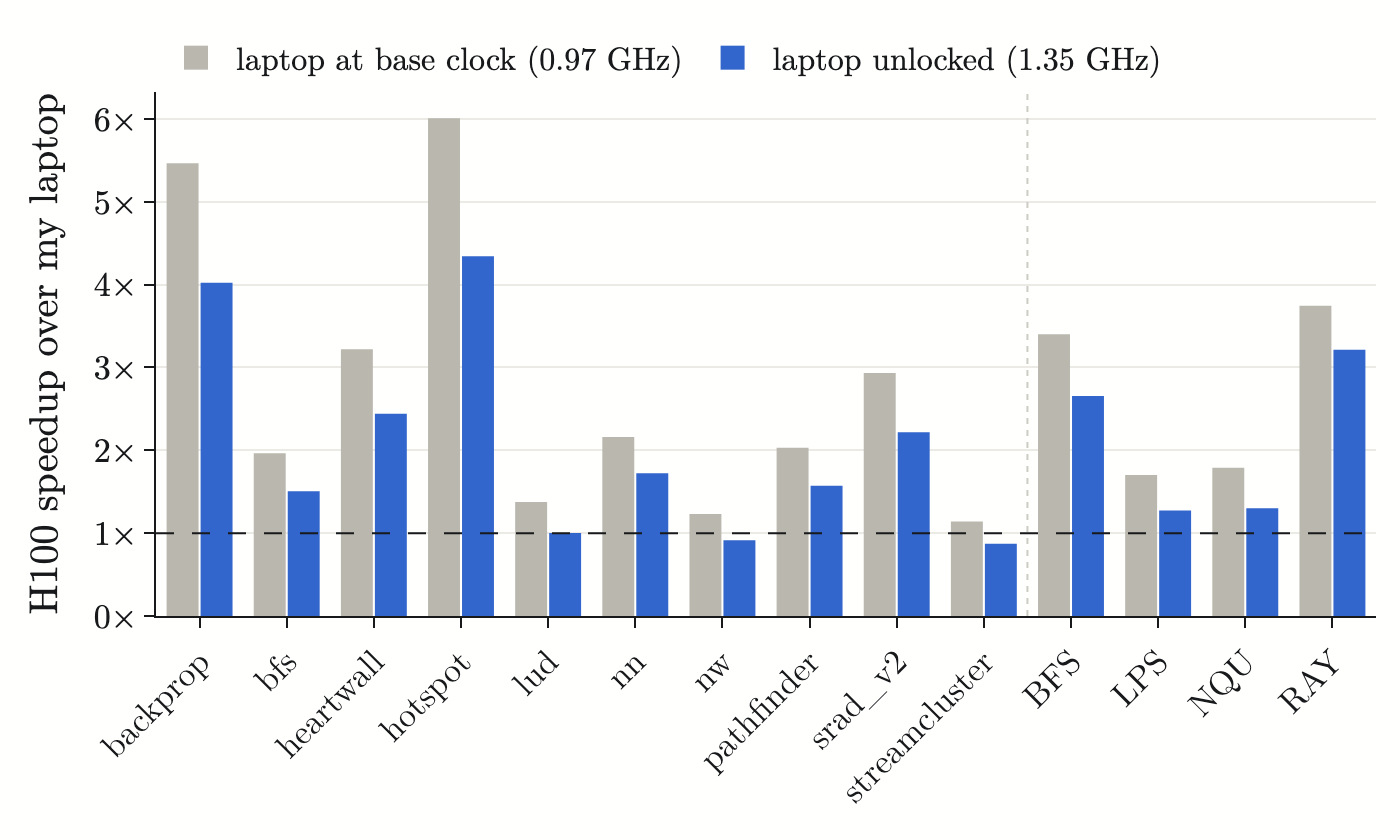
“Real clock” here means unlocked. While profiling, ncu locks the laptop to its 0.97 GHz base clock. Unlocked, it runs at about 1.35 GHz, which makes it 1.31× faster (geomean). The run-to-run spread is 4% or less on every app except heartwall (11%). Against the base-locked laptop, the H100 would be 2.39×.
1.82× is the number to quote for “H100 vs. my laptop”, with one big asterisk: the H100 side is a model running in PTX mode, with no H100 to check it against (section 7).
- The clocks aren’t documented thoroughly, and different sites give different numbers for both GPUs. For the H100, I’m going with the Accel-Sim config: 1980 MHz. For my laptop, the numbers are derived from my own runs: ncu locks it at 975 MHz, and unlocked it averages about 1.35 GHz over these kernels. ↩
5. Speedup
Running simulator against simulator (warm L2 on both, laptop modeled at its 0.975 GHz base clock) brings the gap up to 2.74×:
| geomean, 14 apps | Rodinia (10) | ISPASS (4) | |
|---|---|---|---|
| H100 wall-time speedup | 2.74× | 2.74× | 2.72× |
| … of which clock (1980 / 975 MHz) | 2.03× | 2.03× | 2.03× |
| … of which cycles (cycle×) | 1.35× | 1.35× | 1.34× |
| … kernel execution only (exec×, launch latency removed) | 1.21× | 1.16× | 1.34× |
Which breaks down like this:
2.74× = 2.03× clock × 1.11× launch overhead × 1.21× kernel execution
- clock
- RTX 3060: 975 MHz, H100: 1.98 GHz. The honest clock ratio is 1.47×, since the laptop actually runs at 1.35 GHz when we unlock the Nsight Compute clock (it can go even higher, but the kernels only last microseconds). So base-locked 3060 vs. boosted H100 is kinda unfair here.
- launch overhead
- The config says 3,000 cycles per kernel for the H100 vs. 5,000 for the RTX 3060. It’s a fixed cost added to every kernel launch, and it comes from calibration, not microarchitecture. Keep this one in mind for finding #1.
- kernel execution
- This is the part that benefits from the extra SMs. Only 1.21×, and the next section explains why.
6. SM Scaling
Comparing on SM count is kinda unfair, since the 132 SMs barely matter here: those 2009-era programs can’t really use them.
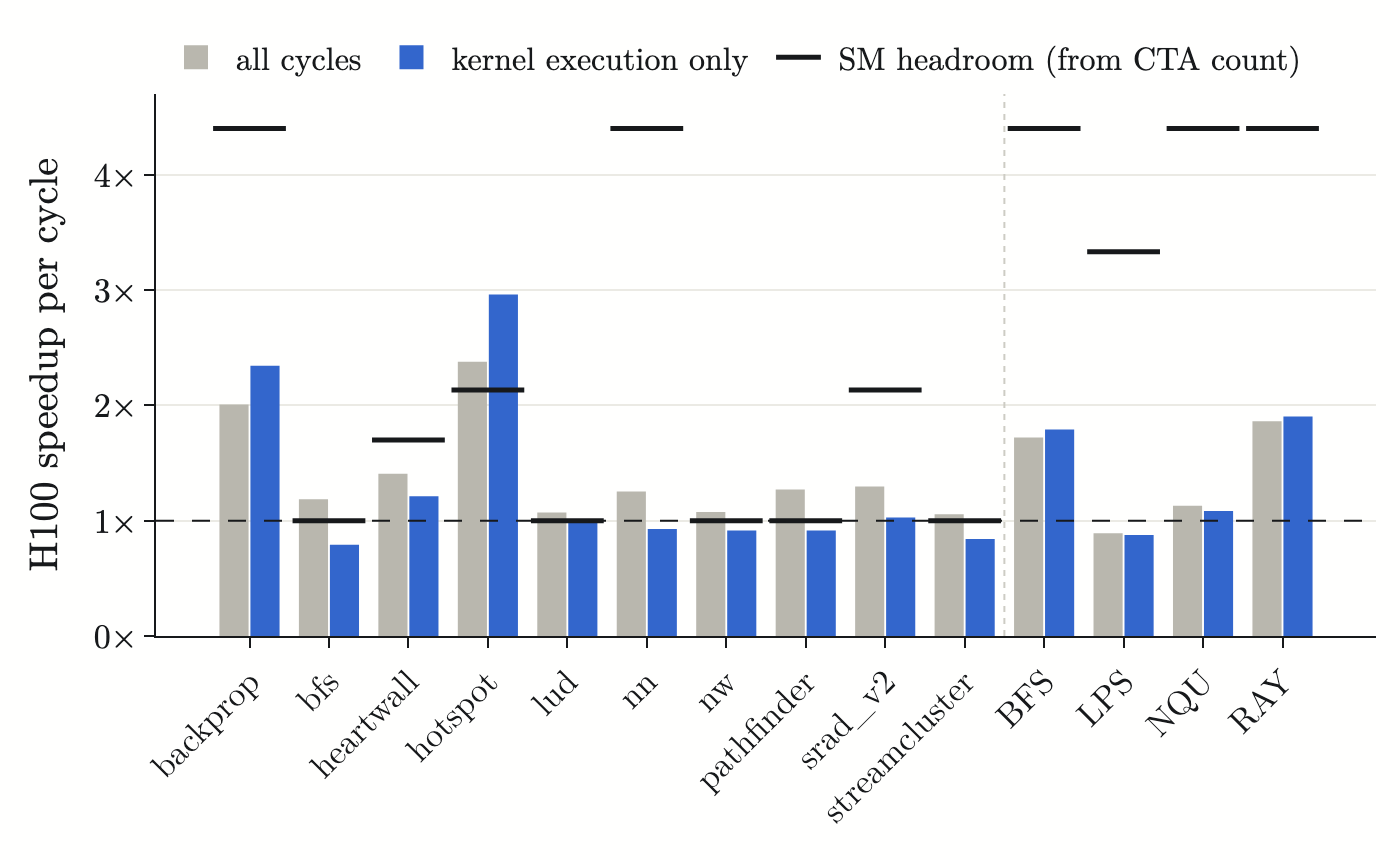
The apps that launch ≤ 30 CTAs (bfs, lud, nw, pathfinder, streamcluster) can’t even fill the 3060. Their exec× geomean is 0.89×, so the H100 runs their kernels slower per cycle. The other 9 apps get 1.44×. As for kernel execution:
- Too few CTAs: some apps launch too few CTAs (bfs: 8, lud: 9, pathfinder: 5, nw: 8, streamcluster: 2), not even enough to saturate the RTX 3060, let alone the H100. Worse, they actually run slower per cycle on the H100 (0.79–0.99×). Memory latency is about 25% higher in cycles on the faster clock (lud: 231 → 288), and with so few CTAs there’s nothing else to do while waiting.
- Enough CTAs, but spread too thin: some apps launch more CTAs (LPS: 100). The RTX 3060 packs about 3.3 per SM, while the H100 spreads them out to 1 per SM. More SMs are busy (100 vs. 30), but each H100 SM only gets one tiny CTA (128 threads = 4 warps). That’s not enough to hide the ~300-cycle wait on every load (same on both GPUs, since LPS is memory-bound). So the H100 trades latency hiding for parallelism, and ends up with about the same cycles as the 3060 (0.88×).
- H100 wins:
- Real SM scaling: backprop (256 CTAs, 2.34×) and RAY (512 CTAs, 1.90×) have enough CTAs to keep lots of SMs busy.
- hotspot (64 CTAs, 2.96×) is compute-bound (its data lives in shared memory). On the RTX 3060, 4 SMs end up with 3 CTAs each, and the kernel only finishes when those busiest SMs finish. The H100 gets 1 CTA per SM, so the ceiling is 3×, and hotspot pretty much hits it.
- Memory congestion relief: BFS waits 803 cycles per memory access on the RTX 3060 (mostly queueing in 12 memory channels), vs. 296 on the H100 (40 channels), for 1.79×. Not lower latency, just no traffic jam.
Also notice how each SM in the RTX 3060 packs more CTAs than the H100? The CTA scheduler deals CTAs out one per SM per round, like dealing cards. For most apps (9 of 15 launch ≤ 132 CTAs), the H100 is done dealing in one round with plenty of SMs left empty, while the RTX 3060 needs several rounds. So CTAs end up sharing SMs (though they usually still all run at the same time). That shows up as much lower occupancy on the H100: backprop drops from 80.7% to 23.8%, nn from 61.1% to 11.0%, and BFS from 60.8% to 14.1%.
7. Can We Trust the Simulator?
None of the numbers above mean much if the simulator is way off. There’s no H100 to check against, but there is a real RTX 3060. From the correlation dashboard, 15 apps (the 14 above plus STO, which only runs on the 3060), warm L2:
| stat | SASS (trace replay) | PTX |
|---|---|---|
| GPC cycles | correl 0.996, err 15.3% | 0.991, 27.7% |
| warp instructions | 0.9997, 0.3% | 0.961, 15.4% |
| L2 reads | 0.998, 2.0% | 0.996, 35.4% |
| L2 write hits | 0.999, 17.1% (~3% without STO) | 0.888, 54.1% |
| L1D read hits | 0.998, 8.4% | 0.907, 32.9% |
| L2 read hits | 0.72, broken (old sim issue, not new in 2.0) | 0.73 |
| DRAM reads | 0.21, 92% | 0.22, 92% |
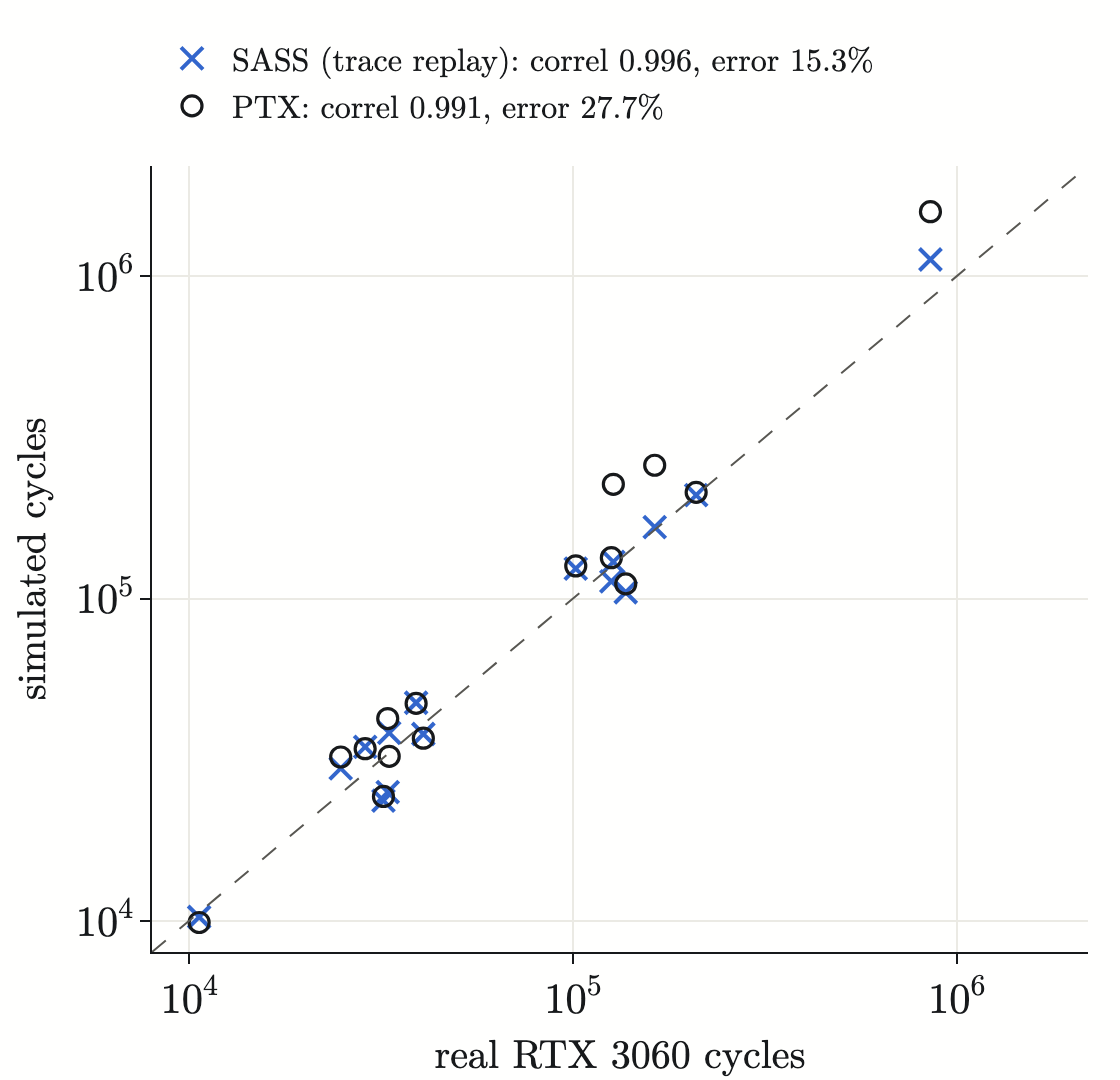
So SASS mode is good on cycles and very good on instructions and L2 traffic. For reference, the paper reports 0.99 correlation and 13.5% cycle error against a real H100, on more than 34,000 kernels of modern workloads, so 15.3% on my 3060 is in the same range. PTX mode (the only mode available for the H100) is roughly 2× less accurate on cycles, and executes ~15% different instruction counts (PTX ≠ the SASS that ptxas actually produces). It’s worst on tiny latency-bound kernels (nw +78%, lud +59%).
L2 write hits use the counter from my PR #141, which counts writes to never-read lines the way NVIDIA hardware does (the mapping that uses it isn’t merged yet, see concerns). They’re within 6% on 12 of 15 apps (NQU is off by 9% and pathfinder by 17%, on only a few hundred hits). STO alone is +213% (sim 24,576 vs. hardware 7,856): it writes one byte at a time, and real hardware seems to merge those writes somewhere between L1 and L2. I dug into that one in the PR discussion.
DRAM traffic and L2 read hits don’t line up in any mode,4 so I don’t read into those numbers anywhere in this post.
As for the H100 side: it’s a model only. No H100 hardware or traces exist here. The direction of each finding is solid (the clock dominates, and few-CTA kernels can’t use the H100), because it follows from CTA counts and config constants, not fine timing. But treat individual exec× values as ±30%.
- The sim over-counts L2 read hits (an old issue, not new in 2.0), and DRAM is probably a unit mismatch: requests vs. 32-byte sectors. ↩
8. Launch Latency
15.3% cycle error sounds good. But look at what happens to the SASS error when the fixed launch latency (5,000 cycles per kernel) is taken out of the simulated cycles:
| app | launch share of sim cycles | SASS error | SASS error, launch latency removed |
|---|---|---|---|
| Rodinia 2.0-ft | |||
| backprop | 42% | −26% | −57% |
| bfs | 65% | +22% | −57% |
| heartwall | 49% | +2% | −48% |
| hotspot | 33% | −24% | −49% |
| lud | 30% | +2% | −29% |
| nn | 58% | +20% | −49% |
| nw | 58% | +2% | −57% |
| pathfinder | 67% | +21% | −61% |
| srad_v2 | 53% | −7% | −56% |
| streamcluster | 58% | +31% | −45% |
| ISPASS-2009 | |||
| BFS | 21% | −1% | −22% |
| LPS | 4% | −10% | −14% |
| NQU | 20% | −23% | −38% |
| RAY | 13% | +15% | +0% |
| STO | 11% | +23% | +10% |
On every Rodinia app except lud, the error swings to around −50%. In other words, the simulated kernels run about 2× faster than the real ones, and the fixed launch cost fills the gap. heartwall and nw look almost perfect (+2%), but half of their simulated cycles come from that one config number.
That doesn’t mean the number is wrong. Real kernels do pay a startup cost, and the config sets 5,000 cycles to match it. But on apps this small, a 15% error says more about how well that one constant was tuned than about how well the SMs and memory are modeled. The ISPASS apps run long enough for launch to stop mattering, and there the errors barely move (LPS −10% → −14%, RAY +15% → +0%).
It matters for the H100 too: launch is 1.11× of the 2.74× speedup, and it comes from 3,000 vs. 5,000 cycles in two config files.
9. Cold L2
-gpgpu_perf_sim_memcpy is a GPGPU-Sim knob that decides whether the simulator pushes cudaMemcpy writes through L2, so kernels start warm. On every NVIDIA GPU since Fermi, L2 is a memory-side cache that all DRAM traffic passes through, so this applies to the 3060 as much as to the H100. Every upstream config, GTX 480 through H200, uses 1.
My 3060M config had 0. 2.0 didn’t touch the memcpy code. The 0 came from our own config (after running the microbenchmarking kernels), not from upstream.
But that microbenchmark run was a false negative. I re-ran it 10 times, and in 7 runs the first load after a cudaMemcpy costs exactly an L2 hit (220.1 vs. 220.6 cycles). The “No” runs come from clock noise: it times two separate kernels at unlocked clocks, and calls anything more than 10% apart “not cached”, in either direction. So the real 3060 keeps copied data in L2. The config is now set to 1, and everything in this post uses warm L2 on both GPUs.
With the old setting, stock vs. stock would’ve handed the H100 a warm cache and the 3060 a cold one (2.94× instead of 2.74×), and the 3060 sim would’ve looked worse than it is (SASS cycle error 18.5% instead of 15.3%, PTX 35% instead of 28%).
Funny enough, the real GPU barely cares. Re-profiling with ncu flushing all caches before every kernel vs. not flushing changes real 3060 cycles by only +0.7% geomean (heartwall +9%, all others within ±3%), since these small apps warm L2 quickly by themselves anyway.
10. Simulator Speed?
We measured that 2.0 is 25% slower on our SASS runs, not 2.2× faster like the paper claimed. Same traces, byte-identical gpgpusim.config, Rodinia 2.0-ft on RTX3060M:
| app | 1.x (July) | 2.0 (now) |
|---|---|---|
| backprop | 11 s | 13 s |
| hotspot | 24 s | 27 s |
| nn | 16 s | 27 s |
| streamcluster | 39 s | 47 s |
| all 10 | 122 s | 152 s |
Potential Explanation: one sample each, integer-second timers, and July’s runs may have shared the machine with other jobs. If anything, that would have slowed July, which makes 2.0’s slowdown conservative.
Not saying they’re wrong tho. The 2.2× is relative to 1.x on their workloads, and they use fast paths I don’t (simple DRAM, the new trace format). 2.0 also does a lot more bookkeeping per cycle (11,072 counters vs. 54), which plausibly costs the most on apps with many memory accesses per cycle (nn is the worst at +69%).
The absolute speed is roughly the same ballpark. The paper says “27.5k kilo warp instructions per second” (the k + kilo looks like a double unit, so I read it as ~27.5K warp instructions/s), and my SASS runs do ~35K warp instructions/s (median, 6.6K–102K across apps).
We also have to be careful with units here (speaking from experience (I was not careful)): GPGPU-Sim’s printed gpgpu_simulation_rate counts thread instructions (0.1–3.2M/s for the same runs), which is 7–32× bigger than warp instructions, depending on how many threads in each warp are active.
Each simulated H100 cycle costs 1.7–5.5× a 3060M cycle. The pathfinder smoke test: H100 10.3 s and 820 MB vs. RTX3060M 2.9 s and 174 MB. Across Rodinia (PTX, warm L2 on both):5
| app | max CTAs | 3060M sim cycles/s | H100 sim cycles/s | cost per cycle | H100 needs fewer cycles by | wall time 3060 → H100 |
|---|---|---|---|---|---|---|
| backprop | 256 | 579 | 336 | 1.7× | 2.0× | 42 s → 36 s |
| heartwall | 51 | 706 | 370 | 1.9× | 1.4× | 14 s → 19 s |
| hotspot | 64 | 1,169 | 445 | 2.6× | 2.4× | 95 s → 105 s |
| lud | ≤ 9 | 19,940 | 3,664 | 5.4× | 1.1× | 13 s → 66 s |
| bfs | 8 | 12,624 | 2,313 | 5.5× | 1.2× | 10 s → 46 s |
Why? The simulator ticks every component every cycle, busy or not:
- SMs: per core cycle, the H100 config has 132 vs. 30 (4.4×).
- L2: the H100’s interconnect and L2 run at 3960 MHz, 2× its core clock. So it’s 80 sub-partitions × 2 = 160 L2 ticks per core cycle, vs. 24 on the 3060M (all 1:1 at 975 MHz): 6.7×.
- Memory channels: 40 vs. 12.
Apps that launch only a few CTAs leave more than 120 SMs idle, but still pay to tick them. So the penalty grows as the CTA count shrinks (backprop 1.7× → bfs 5.5×). Simulating a 132-lane highway with 8 cars costs the same as a full one.
- One run each, so take the exact ratios loosely. Wall time on my laptop swings a lot. Backprop’s 3060 run took 42 s here but 21–26 s in other runs. ↩
11. Other Concerns
- With L2 pre-fill, small inputs never touch DRAM on the H100. The H100’s L2 is 80 sub-partitions × 640 KB = 50 MB. The Rodinia-ft working sets are KBs to a few MB, so once memcpy pre-fills L2, the kernels see zero DRAM reads. That’s measured on pathfinder:
total dram reads = 0. For these inputs, the “H100” result describes its L2 and says nothing about its HBM3. - DRAM is the simple fixed-latency model,
-gpgpu_simple_dram_model 1(“Use simple DRAM by default for H100”). Inmemory_partition_unit::simple_dram_model_cycle()(src/gpgpu-sim/l2cache.cc:247), a request just waits-dram_latency 194cycles in a queue with a bandwidth cap. The detailed HBM3 timing line in the same config (-gpgpu_dram_timing_opt nbk=16:CCD=1:...) is not used, so no banks, no row-buffer hits or misses, no refresh. The 3060M model uses the detailed GDDR6 model. So memory-bound comparisons pit a detailed model against an idealized one. - Only the “big Ampere” part of Hopper is exercised. The binaries contain PTX for sm_60–sm_75 only (
cuobjdump --list-ptx). So none of Hopper’s new features appear: TMA, thread-block clusters / distributed shared memory,wgmma, async transaction barriers. The H100 here is effectively a wider, faster SM86-style GPU with 228 KB of shared memory and a 50 MB L2. That’s fair for 2009-era code, but it’s not what makes Hopper “Hopper”. - Clocks: H100 at boost, 3060M at base. The H100 config runs at 1980 MHz (SXM max boost). The 3060M config runs at 975 MHz, the base clock that ncu locks the card to while profiling (the real laptop can boost to 2100 MHz, but averaged about 1.35 GHz during these short kernels). Wall-time speedups therefore include a 2.03× clock ratio that’s partly an artifact of how each config was calibrated. That’s why I quote cycle speedup (clock removed) next to time speedup.
- The L2 write-hit fix only half shipped. My PR #141 added the
WRITE_ALLOCATEDcounter to the simulator, and it’s in 2.0. But the correlation mapping that actually uses it (L2 write hits = HIT + WRITE_ALLOCATED) is in PR #551, which is still open. So the write-hit numbers in this post come from my own setup. With the stock 2.0 scripts, the dashboard still compares plain HIT, and write hits come out near zero on streaming apps. Also, with this mapping the sim’s write hit rate is 100% by construction, so the 0.999 mostly says the write counts match (the hardware reports ~100% write hits too). The paper doesn’t run into this because it never correlates L2 write hits. Its plots only cover cycles, warp instructions, L1 and L2 accesses, and L1 and L2 misses (I’m gonna file an issue on this). More on the fix itself in the L2 post. - I don’t have an H100. Every H100 number here comes from the model, with no hardware to check it against.
12. Verdict
The hydrogen bomb, obviously. But only by 1.82× against my real laptop, most of that from its clock, and on lud, nw and streamcluster the coughing baby ties or wins. Without modern workloads, the H100 is just a normal GPU with more SMs and more bandwidth, and these apps can’t even use the SMs.
Honestly though, the battle wasn’t the interesting part. Running the benchmarks was easy (I’m lying). The findings above are what’s interesting. You only catch stuff like that by correlating against real hardware and asking why the numbers look the way they do. That was also the point of this whole thing.
Next up: rent a real H100 ($4/hour I believe), run the same correlation flow on it (ncu, and GPUVision this time), and trace modern kernels like CUTLASS Hopper GEMMs and FlashAttention-3 in SASS mode, where TMA, clusters and WGMMA actually show up.
It won’t be a rematch though. My poor laptop is not running heavy ML workloads, so the 3060 sits that one out.
See you in the next one!
References
- J. Pan et al., “Architecting the next generation of asynchronous, distributed GPUs for the AI era,” 2026, arXiv:2608.22602.
- S. Che et al., “Rodinia: A benchmark suite for heterogeneous computing,” in Proc. IEEE Int. Symp. Workload Characterization (IISWC), 2009, pp. 44–54, doi: 10.1109/IISWC.2009.5306797.
- A. Bakhoda, G. L. Yuan, W. W. L. Fung, H. Wong, and T. M. Aamodt, “Analyzing CUDA workloads using a detailed GPU simulator,” in Proc. IEEE Int. Symp. Perform. Anal. Syst. Softw. (ISPASS), 2009, pp. 163–174, doi: 10.1109/ISPASS.2009.4919648.